Acquiring Google Business Reviews is essential for enhancing your business’s online presence and credibility. Here’s how to get more authentic, positive reviews:
1. Deliver Exceptional Service
- Ensure your customers have a great experience. Satisfied customers are more likely to leave positive reviews.
2. Ask for Reviews Directly
- Politely request reviews from happy customers after a purchase or service.
- Use phrases like:
- "We’d appreciate it if you could share your experience on Google."
- "Your feedback helps us grow. Would you mind leaving a review?"
3. Provide Clear Instructions
- Share your Google review link. To create it:
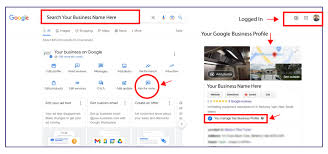
- Go to your Google Business Profile dashboard.
- Click on “Get more reviews” to generate a shareable link.
- Share this link via email, SMS, social media, or printed materials.
- Include step-by-step instructions for less tech-savvy customers.
4. Leverage Follow-Up Emails
- Send post-purchase emails thanking customers and inviting them to leave a review.
- Keep the email short and include your review link.
5. Use In-Store or On-Site Prompts
- Display posters, QR codes, or signage encouraging customers to leave a review.
- Add phrases like “Scan this code to review us on Google!”
6. Engage on Social Media
- Post reminders on platforms like Facebook, Instagram, or Twitter, asking customers to review your business.
- Use captions like “Loved our service? Leave us a review on Google!”
7. Offer Incentives (Carefully)
- While offering discounts or gifts for reviews can violate Google’s policies, you can encourage reviews by entering customers into a giveaway or contest without requiring positive feedback.
8. Respond to All Reviews
- Show appreciation for positive reviews.
- Address negative reviews professionally and offer solutions to resolve issues.
- Responding shows you value customer feedback and can encourage others to review.
9. Train Your Team
- Ensure your staff understands the importance of reviews.
- Encourage them to ask customers for reviews after positive interactions.
10. Use SMS and WhatsApp
- Send a polite message with a link asking for feedback.
- Example:
- "Thank you for choosing [Business Name]! We’d love your feedback. Please leave us a review here: [Link]"
11. Highlight Reviews
- Showcase positive reviews on your website, social media, or newsletters.
- This can inspire other customers to share their experiences.
12. Use Review Management Tools
- Tools like Birdeye, Podium, or Grade.us can help you request, track, and manage reviews.
Avoid These Pitfalls
- Fake Reviews: Don’t purchase reviews or write fake ones; this violates Google’s policies.
- Forcing Reviews: Don’t pressure customers into leaving reviews. Authentic feedback builds trust.
- Get Google Business Reviews